AI Career Advancement is a structured, practice-oriented training program designed to bridge this gap.
This program goes beyond exam preparation or theoretical learning. It focuses on how AI, Machine Learning, and Generative AI solutions are actually designed, deployed, and discussed in real enterprise environments using Azure.
It is ideal for professionals who want to move toward AI Solution Architect, AI Lead, AI Advisor, or senior technical roles.
Who This Program Is For
This program is best suited for:
IT professionals with 5+ years of experience
Cloud, DevOps, Data, Application, or Infrastructure professionals
Professionals preparing for AI/GenAI-oriented roles or senior technical discussions
Those who want practical clarity, not just certifications
🚫 This is not a beginner course and not a shortcut job program.
What Makes This Program Different
Unlike generic AI courses, this program emphasizes:
Solution-oriented thinking rather than tool memorization
Clear understanding of AI vs Machine Learning vs Generative AI
How Azure AI services are combined to build end-to-end AI solutions
Practical exposure to DevOps vs MLOps deployment scenarios
Real-world decision-making, trade-offs, and cost-effective AI design
The goal is to help you think, explain, and operate like an AI professional, not just learn APIs.
Practical use of Generative AI models and transfer learning
Machine Learning fundamentals and MLOps workflows
Real-life enterprise scenarios across different industries
Interview discussion preparation and professional positioning
Career Readiness & Professional Growth
In addition to technical learning, the program includes:
Mock interview discussions
Career guidance for AI-focused roles
Practical insights on personal branding and professional positioning
Guidance on presenting AI solutions to technical and non-technical stakeholders
This helps you translate skills into career confidence.
Instructor Perspective
The program is designed and delivered by a professional with 25+ years of global IT experience across multiple countries, who has coached and mentored IT professionals worldwide into higher technical and leadership roles.
The focus is on real-world applicability, clarity, and long-term career relevance.
Outcome You Can Expect
After completing this program, you should be able to:
Understand where and how AI and GenAI fit into enterprise solutions
Confidently discuss AI architecture and design decisions
Apply Azure AI services in practical scenarios
Position yourself for AI-oriented senior technical or advisory roles
Final Note
This program is designed for professionals who value depth, structure, and practical understanding.
If you are looking for quick shortcuts or instant guarantees, this program may not be the right fit. If you want clear thinking, real-world exposure, and career-aligned AI knowledge, this program is built for you.
The course visible structure is as below, there many folders kept under privacy. Unless you have access to them you can not see them:
These are worth learning for job tasks performing and for interviews also, on the below roles.
10 CAREER & ROLE–RELATED QUESTIONS
1️⃣ AI Solution Architect / AI Technical Lead Can I design and clearly explain an end-to-end AI or GenAI solution on Azure, including service selection, architecture decisions, and trade-offs?
2️⃣ Generative AI Engineer / Specialist Do I understand how Generative AI models are applied in real business scenarios beyond demos, including integration, cost control, and scalability?
3️⃣ AI / ML Engineer (Applied) Can I connect machine learning concepts with actual Azure AI services and deploy them in production-like environments?
4️⃣ MLOps Engineer Do I clearly understand how MLOps workflows differ from DevOps, and can I explain model deployment, monitoring, and lifecycle management confidently?
5️⃣ Cloud AI Engineer (Azure) Am I comfortable combining Azure Cognitive Services, Cognitive Search, and other AI services into a single, working solution rather than using them in isolation?
6️⃣ AI Advisor / Consultant Can I translate business problems into AI solution recommendations and communicate them effectively to non-technical stakeholders? 7️⃣ Pre-Sales AI Solution Consultant Can I confidently present AI architectures, use cases, and value propositions during client discussions or pre-sales engagements?
8️⃣ Senior DevOps → AI Transition Am I able to extend my DevOps experience into AI/MLOps workflows without feeling disconnected from the AI model lifecycle?
9️⃣ Technical Program / Delivery Lead Do I understand enough about AI and GenAI solution design to guide teams, review architectures, and make informed technical decisions?
🔟 Career Maturity & Long-Term Relevance Am I preparing myself for senior AI-oriented roles that require solution thinking, communication, and judgment — not just tool usage? Study this program to gain practical skills and sustainable career solutions across multiple GenAI roles.
Why Modern Applications Need Both Vibe-Coding and No-Coding
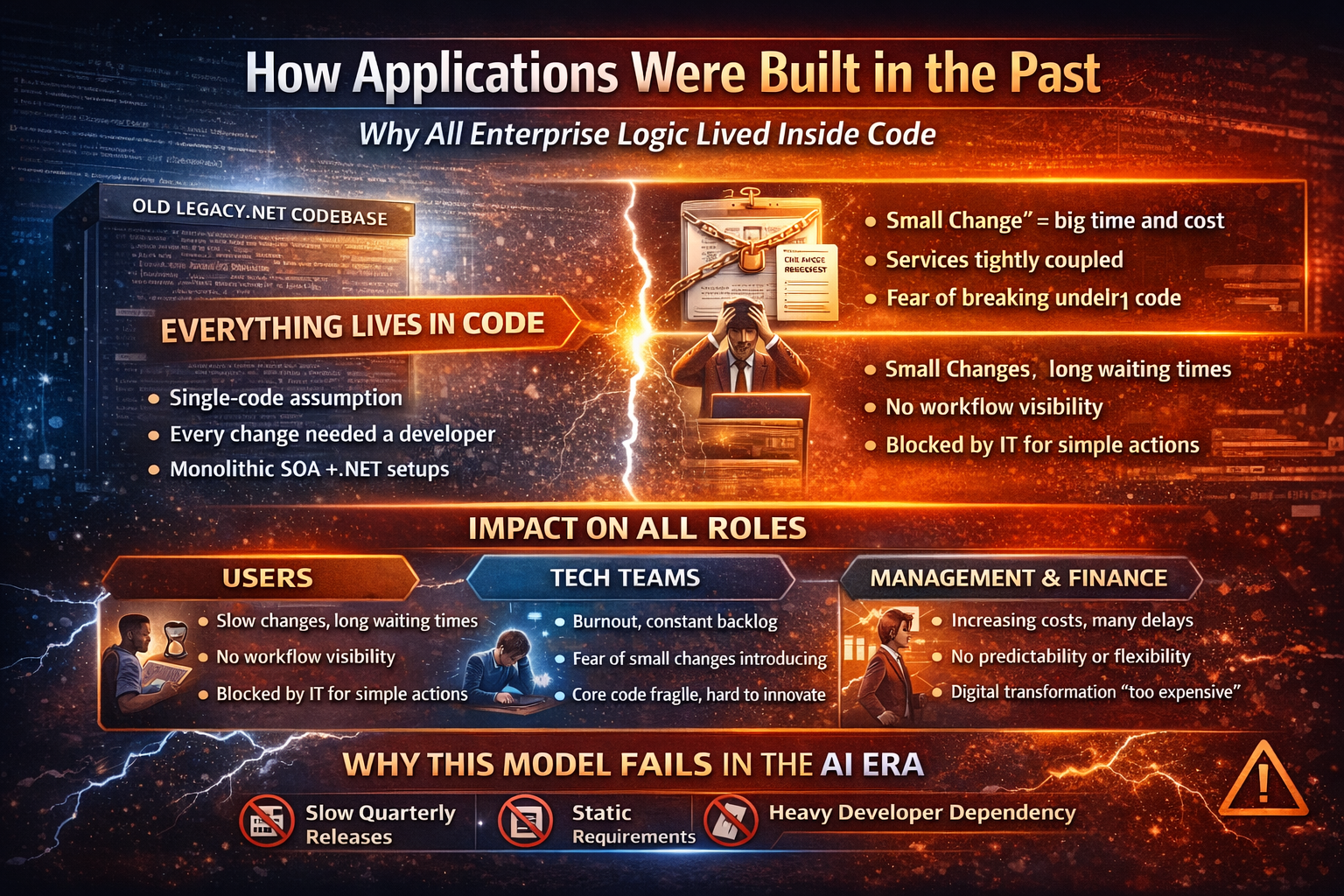
How Applications Were Built in the Past
Before we embrace AI, Vibe-Coding, and No-Coding workflows, it’s essential to understand how traditional applications were built, why the old model created bottlenecks, and why it fails in today’s fast-moving business world.
1.1 The Single-Code Assumption
Historically, every enterprise application was built with one principle:
“All logic belongs inside the codebase.”
This meant:
Business rules, validations, approvals, notifications — everything lived in the same code.
Any change, even a small one, required developer intervention.
Consequences of this assumption:
IT teams became the bottleneck for all changes.
Users waited days or weeks for even minor workflow adjustments.
Flexibility and business agility were almost impossible.
1.2 Why Every Change Needed a Developer
Because all logic was embedded in code, a change was never trivial:
Business Request: “Add an extra approval step for high-value transactions.”
Developer Action:
Locate the relevant code module
Update business rules
Refactor integration points
Test the system for side effects
Deployment: Deploy change to production with full QA cycles
Even small changes became weeks-long projects, consuming high-value developer time and delaying business outcomes.
1.3 Traditional SOA and .NET Realities
Many enterprises adopted SOA (Service-Oriented Architecture) with frameworks like .NET to try to modularize applications.
Reality of SOA + .NET in the past:
Services were modular but still hard-coded for orchestration.
Integration logic was brittle: any service update could break workflows.
Scaling and error recovery required manual intervention.
The architecture promised flexibility but delivered dependency on tech teams for every change.
1.4 Past Repository Structure and Ownership
A typical legacy .NET repository looked like this:
/Application
├── Controllers
├── Services
│ ├── BusinessRules.cs
│ ├── IntegrationLogic.cs
│ ├── ApprovalLogic.cs
├── Jobs
├── Utilities
Observations:
All logic lived together in monolithic files.
No clear ownership — developers managed everything, business had no control.
Deployment risk was high: one small change could affect unrelated workflows.
Over time, this structure became fragile, creating fear of touching “core code.”
1.5 Impact on Users, Tech Teams, Management, and Budgets
Users
Long waiting times for requests
No visibility of workflow status
Dependency on IT for simple actions
Tech Teams
Burnout from repetitive small changes
Fear of introducing bugs
Less time for innovation
Management
Rising costs with limited visible progress
Delivery delays blamed on “complexity”
Difficulty planning for growth
Finance
Each change = additional cost
No predictability of timelines or budgets
Digital transformation always seen as “too expensive”
1.6 Why This Model Collapses in the AI Era
Modern systems require:
Hourly or daily changes, not quarterly releases
Intent-driven orchestration
Non-technical workflow adjustments
Legacy models assume:
Static requirements
Slow, predictable change
Heavy developer dependency
AI, Vibe-Coding, and No-Coding workflows cannot operate on a code-only foundation. Without change, enterprises risk stagnation, technical debt, and lost competitiveness.
✅ Key Takeaways
All-logic-in-code is no longer sustainable.
Every role (user, tech, management, finance) suffers from the legacy model.
Modernization is not optional — the business demands speed, flexibility, and low-risk change.
This is the foundation for why Vibe-Coding and No-Coding layers are critical — a solution that keeps code stable, AI agile, and workflows flexible.
2. The Shift — From Code-Centric to Responsibility-Centric Systems
Modern enterprises cannot thrive by simply layering AI on top of legacy systems. To succeed, organizations must shift from a code-centric mindset to a responsibility-centric approach, where each layer of the application has a clear role, and the right people own the right part of the system.
This shift is the foundation for adopting Vibe-Coding and No-Coding workflows effectively.
2.1 What Actually Changes in Modern Applications
In legacy systems, every change was funneled through developers. Today, modern applications are split into layers, each responsible for a different aspect of the system:
Core Code: Houses critical logic that cannot fail, like payment processing or security checks. Developers maintain and protect this layer.
Vibe-Coding Layer: Handles system orchestration, AI-assisted integration, and repetitive tasks. Engineers describe the desired intent, and AI generates the implementation.
No-Coding Layer: Powers visual workflows, notifications, approvals, and business operations. Non-technical teams can safely make changes here without touching code.
This shift allows faster change, reduced risk, and greater business agility. Small workflow changes no longer require developer intervention, freeing IT to focus on core innovation.
2.2 Moving from Tools to Layers of Responsibility
Many enterprises make the mistake of thinking that installing new tools alone will solve their modernization problems. Modernization isn’t about tools—it’s about clarity in responsibility.
In a responsibility-centric system:
Developers focus on core code, ensuring system stability, performance, and compliance.
Engineers using Vibe-Coding orchestrate integrations, refactor legacy code safely, and automate repetitive tasks.
Business teams control operational workflows, approvals, and notifications visually.
By clearly defining who owns each layer, organizations reduce risk, accelerate change, and make modernization measurable and predictable.
2.3 Why Coding, Vibe-Coding, and No-Coding Must Coexist
Some organizations ask: “If we have AI, why do we need coding? If we have No-Code, why do we need AI?”
The answer is simple: each layer addresses a different problem. Coding provides stability and reliability, Vibe-Coding enables speed and automation, and No-Coding empowers business teams. Removing any layer either slows change, increases risk, or creates governance chaos.
A layered approach ensures that:
Developers safeguard critical logic
AI accelerates orchestration and integration
Business users can act independently without breaking the system
Together, these layers create a system that is fast, safe, and adaptable.
2.4 Common Mistakes Enterprises Make During Modernization
Tool-Only Mindset: Installing AI or No-Code platforms without defining responsibilities leads to confusion and risk.
Ignoring Core Code: Moving everything to AI or No-Code can destabilize critical systems.
No Clear Role Ownership: Without defined ownership, workflows fail and change management breaks down.
Neglecting Training: Users, tech teams, and management must understand the new layers to adopt them successfully.
Key Takeaways
Modernization is about responsibilities, not just tools.
Coding ensures reliability, Vibe-Coding enables automation, and No-Coding empowers business users.
Layering responsibilities correctly is essential for safe, scalable, and agile applications.
Training and governance are critical to adoption and success.
This foundation sets the stage for splitting a live .NET application into Vibe-Coding and Workflow layers, which will be detailed in the next sections.
3. Understanding the Three Practices
Modern application development is no longer about choosing between Coding and No-Coding. Today, enterprises thrive by leveraging three complementary practices: Coding, Vibe-Coding, and No-Coding. Each layer has a distinct purpose, ownership, and value, and together they create a flexible, safe, and fast system.
Understanding these three practices is essential for anyone involved in AI modernization, digital transformation, or enterprise workflow innovation.
3.1 Coding — The System Integrity Layer
Role: Ensures stability, reliability, compliance, and performance.
What it does:
Contains the core logic of the application.
Manages security, regulatory compliance, and critical business rules.
Handles high-risk processes that cannot tolerate failure.
Maintains system architecture, database integrity, and critical integrations.
Who owns it: Developers and architects are responsible for coding, reviewing, testing, and deploying this layer.
Key characteristics:
High control, low speed for routine changes
Requires technical expertise
Acts as the foundation for all other layers
Example: In a banking application, payment authorization, risk scoring, and encryption routines reside in this layer. Any failure here could compromise system stability or compliance.
Why it matters: Without this layer, AI or No-Code workflows would be building on a fragile base, increasing risk of downtime, compliance violations, or operational failure.
3.2 Vibe-Coding — The Architectural Velocity Layer
Role: Accelerates development, integration, and orchestration using AI-assisted coding.
What it does:
Developers describe intent rather than writing all logic manually.
AI interprets the intent and generates code, refactors existing code, or orchestrates workflows.
Handles repetitive, boilerplate, or integration-heavy tasks.
Ensures architectural consistency while reducing manual errors.
Who owns it: Senior engineers and architects use Vibe-Coding to bridge the gap between core systems and operational workflows.
Key characteristics:
Medium control, high speed for integration tasks
AI-assisted: humans guide intent, AI generates implementation
Scales coding efforts without adding headcount
Example: In an eCommerce system, Vibe-Coding can automatically orchestrate order flows between inventory, payment, shipping, and CRM systems, including retry logic for failed processes.
Why it matters: Vibe-Coding dramatically increases velocity while maintaining architectural integrity. It ensures core logic is respected while enabling automation and rapid adaptation to changing business needs.
3.3 No-Coding — The Business Autonomy Layer
Role: Empowers non-technical teams to manage workflows, notifications, and operational processes visually.
What it does:
Uses drag-and-drop tools to configure business processes.
Allows product owners, operations, and business teams to create, modify, and track workflows without touching code.
Provides dashboards, notifications, and approvals for end users.
Reduces dependency on IT for operational changes.
Who owns it: Business users, product owners, and operations teams.
Key characteristics:
Low control, very high speed for business operations
Changes are visible and auditable
Encourages experimentation and rapid adaptation
Example: In HR onboarding, No-Code workflows can automatically trigger account creation, equipment provisioning, manager approvals, and welcome emails — all without a developer writing a single line of code.
Why it matters: No-Coding allows organizations to respond instantly to business needs, increase employee productivity, and reduce the cost and time of operational changes.
✅ Key Takeaways
Coding provides stability and compliance — it’s the foundation.
Vibe-Coding adds speed and architectural intelligence — it’s the accelerator.
No-Coding empowers business teams — it’s the autonomy layer.
All three practices must coexist; ignoring any layer either slows change, increases risk, or creates governance issues.
Layering these practices is the cornerstone of modern enterprise applications, enabling safe innovation, operational agility, and AI-driven modernization.
This understanding is critical before we move into splitting live applications into Vibe-Coding and Workflow layers, which will be covered in the next section.
We also mentor the CXOs on the AI Practices.
We build legacy profiles to handle the above mentioned activities.
Follow our linkedin newsletter on Regular AI Practices:
The Silent Crisis of 2026: Why Corporate America is Slashing Over 1.1 Million Middle-Class Jobs
For decades, the “American Promise” was simple: work hard, remain loyal, and your experience will protect you. However, 2026 is emerging as a critical breaking point where this promise is being dismantled, not by a single villain, but by a cold transition toward machine efficiency. Over 1.1 million jobs are projected to disappear, primarily affecting the middle class and high-skilled professionals.
The crisis is most visible in the companies that serve as the “thermometer” of the American wallet.
Walmart: Despite its status as an essential retailer, Walmart is cutting approximately 1,500 positions. These aren’t entry-level roles; they are logistics personnel and supply chain coordinators earning between $70,000 and $100,000 annually. As food prices have surged by 15% to 22%, consumers are buying less, leading to excess warehouse space and the rapid deployment of automated scanners and queuing robots that don’t require sick leave.
UPS: In a “seismic” move, UPS is cutting 48,000 jobs, including drivers, warehouse staff, and middle management. By investing billions in sorting robots and smart warehouses, the company aims to save $3 billion annually, proving that even union-protected roles are no longer immune to automation.
Amazon: Leading the rehearsal for a “new economy,” Amazon is cutting between 14,000 and 30,000 jobs across AWS, advertising, and logistics. With over $50 billion invested in AI and automation, Amazon is transitioning to a system where humans are no longer the center of operations.
The Erosion of Industrial Excellence
In sectors where safety and craftsmanship were once paramount, the balance sheet is beginning to take precedence over experience.
Boeing: Facing over $31 billion in accumulated losses, Boeing is cutting 2,500 jobs. Critically, these cuts target engineers and quality control experts responsible for flight safety, who earn up to $140,000 a year. This raises concerns about whether safety standards are being sacrificed for financial adjustments.
Intel: As a symbol of American industrial power, Intel’s cut of 20,000 jobs signals a massive shift. Despite national efforts for semiconductor independence, Intel is struggling to pivot from CPUs to the booming AI GPU market, leading to massive layoffs in communities dependent on these six-figure salaries.
General Motors (GM): Despite a $35 billion investment in electric vehicles (EVs), GM is cutting 3,400 battery and software engineering jobs. The “green future” has collided with the reality that many Americans cannot afford $50,000+ EVs while facing high interest rates and rent.
The Tech Paradox: AI Replacing Its Creators
Perhaps the most unsettling trend is in the technology sector, where intellectual labor was once considered a “safe bastion”.
Microsoft: Despite earning tens of billions in profit, Microsoft is cutting 6,000 jobs. In a modern paradox, AI is replacing the software engineers and cloud architects who helped create it. Because training AI models can cost up to $100 million, the company is cutting human personnel to compensate for massive infrastructure costs.
IBM: Seeking to save $250 million annually, IBM is cutting 2,700 jobs in cloud and cybersecurity. The company estimates that internal AI can replace roughly 30% of its workload, making long-term experience a “burden” rather than an asset.
Salesforce: Known for its “Ohana” (family) culture, Salesforce is cutting 4,000 positions. The company is pivoting to AI-driven CRM systems that can write emails and forecast revenue, saving $300 million in labor costs while signaling that “corporate culture” is often secondary to profit margins.
The Infrastructure Strain
Even the “blood vessels” of the economy are tightening. Verizon is cutting 15,000 jobs, including technicians and maintenance teams. While the company pours billions into 5G, consumers are downgrading to cheaper plans to manage mounting bills, forcing the company to view essential service personnel as a cost to be cut.
Conclusion: A New Reality
The year 2026 represents more than just a series of corporate restructurings; it is the end of an era where loyalty and degrees provided a shield against economic volatility. As companies prioritize machine efficiency to protect profit margins, the middle class finds itself increasingly positioned on the “assembly line” of automation.
The transition can be understood through the lens of a lighthouse: For a century, the middle class was the lighthouse keeper, essential for guiding the economy safely. Now, corporations are installing automated LED beacons. The light still shines, and the ships still move, but the keeper is being told their presence is no longer required for the system to function.
Based on the sources provided, the mass layoffs projected for 2026 are primarily targeting roles that have been transformed into “operating costs per machine hour”. To sustain a profession alongside AI, you must transition from performing replaceable tasks to overseeing the systems and strategies that machines cannot yet fully replicate.
The following are skill upgrades and the types of portfolio-proven experiences you can develop to remain essential:
1. AI-Assisted Development and Oversight
The sources indicate that AI can now write documents, test software, debug, and support operations. Instead of simply performing these tasks, you should upgrade to AI Systems Oversight.
Skill Upgrade: Mastering the ability to direct AI tools for high-level software architecture and quality assurance.
Portfolio Evidence: A collection of case studies or GitHub repositories demonstrating how you used AI to debug complex systems or optimize code. Your portfolio should highlight the human “judgment” aspect—showing where you caught errors or “bugs” that automated systems might have missed.
2. GPU and Next-Generation Hardware Architecture
A significant insight from the sources is the shift from traditional CPUs to GPUs for AI infrastructure. Professionals who understand this hardware transition are better positioned than those clinging to legacy systems.
Skill Upgrade: Shifting from general IT or traditional semiconductor knowledge to specialized AI infrastructure management and GPU-based computing.
Portfolio Evidence: Documentation of projects involving AI model training, GPU resource allocation, or high-performance computing infrastructure. This proves you are aligned with where companies like Intel and Microsoft are pouring billions of dollars in investment.
3. Strategic Business Consulting and AI Implementation
While IBM is cutting business consulting roles due to automation, the remaining value lies in implementing these efficiencies.
Skill Upgrade: Learning to integrate AI-driven CRM systems (like those used by Salesforce) to forecast revenue and analyze customer behavior.
Portfolio Evidence: Data-backed reports showing how you implemented automation to save a specific amount of labor costs (e.g., a “300 million dollar saving” equivalent for your scale) or how you used AI to forecast revenue trends that informed a successful business pivot.
4. Complex Problem Solving in Safety and Quality Control
The sources highlight that Boeing is cutting engineers and quality control experts to save money, even as “new bugs” appear. This suggests a vacuum for professionals who can handle high-stakes troubleshooting.
Skill Upgrade: Deep specialization in safety standards, quality assurance, and ethical AI oversight—areas where “mistakes don’t get a second chance”.
Portfolio Evidence: A “Safety Log” or “Crisis Management” section in your portfolio that details how you identified and resolved critical system vulnerabilities that could not be solved by a standard algorithm or automated scanner.
5. Moving into “Core” Technical and Strategic Teams
Salesforce specifically targeted “non-core” technical teams for layoffs. Staying relevant requires proving your work is essential to the company’s “center of the operating system”.
Skill Upgrade: Moving from “replaceable services” (like basic customer service or sales ops) into Core Product Development or Direct Revenue Generation.
Portfolio Evidence: Testimonials or project summaries that tie your work directly to the company’s primary revenue stream or its most critical technological infrastructure, such as Cloud Data or Cybersecurity.
Information Outside the Sources: To build a truly effective portfolio in these areas, you may want to use platforms like GitHub for technical code, Tableau for data visualization of your AI-driven savings, or LinkedIn Articles to demonstrate your thought leadership in “human-centered” AI strategy. These specific platform recommendations are not found in the sources and should be verified independently.
Analogy for Understanding: Think of the job market as a rising flood. If your skill set is like a ground-floor apartment (repetitive, predictable tasks), you are at risk. Upgrading your skills is like building additional stories on your house. Your portfolio is the blueprint and inspection report that proves to an employer that your “house” is now high enough to remain dry and functional while the “water” of automation rises around it.
U.S. employers announced over 1.1 million job cuts in the first 11 months of 2025, marking a 54% increase from 2024 and the highest since 2020. This “silent crisis” or “forever layoffs” trend involves rolling, smaller-scale reductions rather than massive one-time events, primarily affecting middle-class white-collar roles.youtubefortune+2
Key Statistics
Layoff announcements totaled 1,170,821 through November 2025, with November alone seeing 71,321 cuts—the highest for that month since 2022. Hiring plans lagged far behind at 497,151 announced positions, down 35% year-over-year. Tech led with over 150,000 cuts, followed by telecom, retail, and services.fortune+3
Primary Causes
Corporate restructuring, AI adoption (linked to 54,694-70,000+ cuts since 2023), economic conditions, tariffs, and business closures drove most reductions. Tariffs raised costs, especially for small businesses, while AI automated routine tasks. Surveys indicate 58% of companies plan further 2026 layoffs due to economic uncertainty (55%), tariffs/trade (39%), and AI (35%).cnbc+4
2026 Outlook
The trend signals a “jobless boom” or “K-shaped” recovery, with productivity gains from AI offsetting fewer workers amid ongoing insecurity. Small businesses bore heavy losses (e.g., 120,000 in November), while larger firms added roles selectively. Experts warn of chronic morale erosion and reduced bargaining power for workers into 2026.finance.yahoo+2
U.S. employers announced over 1.1 million job cuts in the first 11 months of 2025, marking a 54% increase from 2024 and the highest since 2020. This “silent crisis” or “forever layoffs” trend involves rolling, smaller-scale reductions rather than massive one-time events, primarily affecting middle-class white-collar roles.youtubefortune+2
Key Statistics
Layoff announcements totaled 1,170,821 through November 2025, with November alone seeing 71,321 cuts—the highest for that month since 2022. Hiring plans lagged far behind at 497,151 announced positions, down 35% year-over-year. Tech led with over 150,000 cuts, followed by telecom, retail, and services.fortune+3
Primary Causes
Corporate restructuring, AI adoption (linked to 54,694-70,000+ cuts since 2023), economic conditions, tariffs, and business closures drove most reductions. Tariffs raised costs, especially for small businesses, while AI automated routine tasks. Surveys indicate 58% of companies plan further 2026 layoffs due to economic uncertainty (55%), tariffs/trade (39%), and AI (35%).cnbc+4
2026 Outlook
The trend signals a “jobless boom” or “K-shaped” recovery, with productivity gains from AI offsetting fewer workers amid ongoing insecurity. Small businesses bore heavy losses (e.g., 120,000 in November), while larger firms added roles selectively. Experts warn of chronic morale erosion and reduced bargaining power for workers into 2026.finance.yahoo+2
(Intro + human skills sections remain the same as before — I’ll keep them intact and focus on expanding the roadmap with “in‑house build” alternates.)
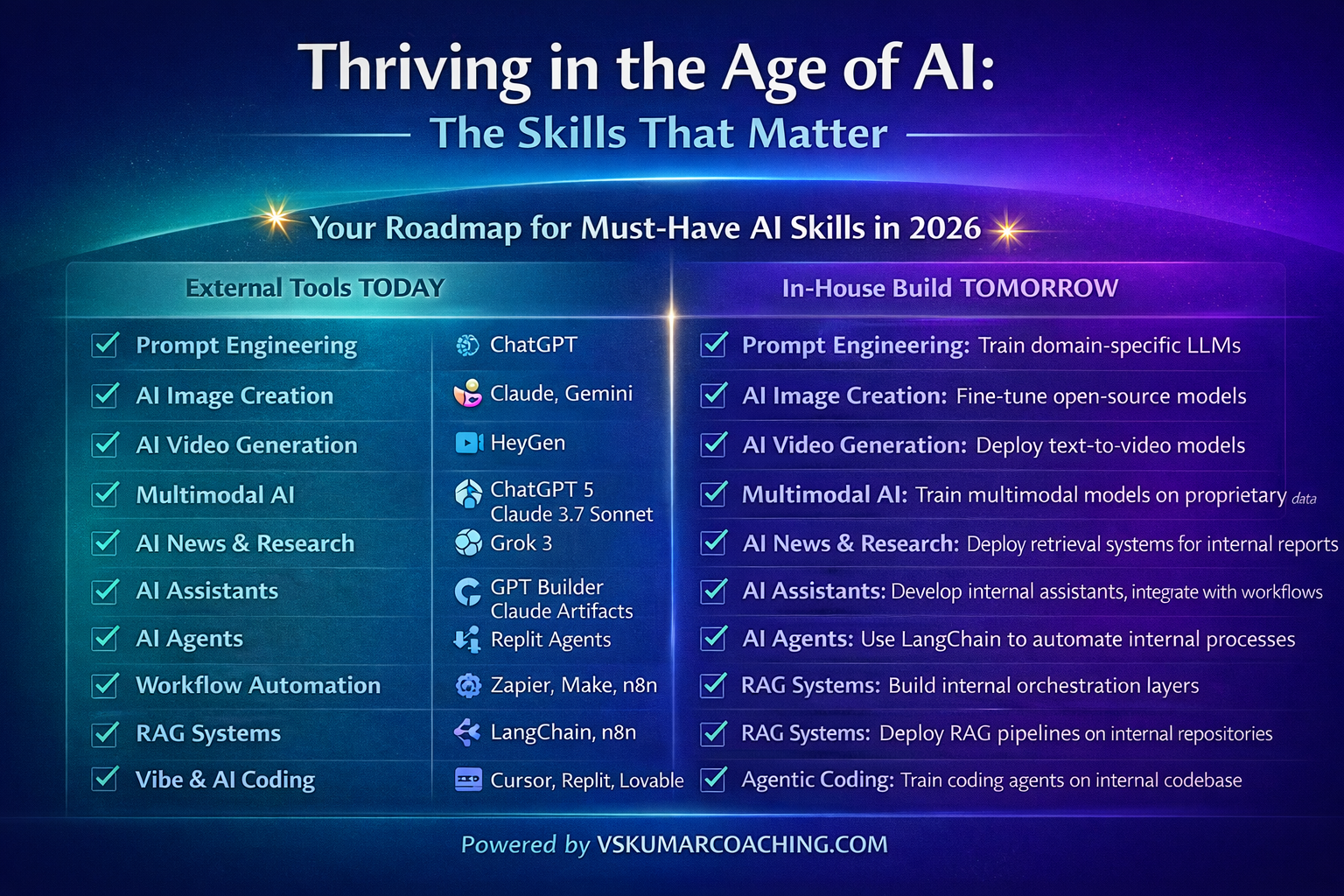
💥 Your Roadmap for Must-Have AI Skills in 2026
1. Prompt Engineering
Intro: At the heart of AI interaction lies the ability to communicate clearly. Prompt engineering is the skill of crafting precise instructions that guide AI toward useful, reliable outputs.
Write precise, context-clear instructions for reliable results
Break work into steps and guide AI with clean inputs
Tools: ChatGPT, Claude, Gemini
In‑House Build:
Train domain-specific LLMs with curated prompts and responses from your own workflows.
Build a prompt library inside a knowledge base for reusable, standardized instructions.
Develop internal “prompt QA” systems to test reliability before deployment.
2. AI Image Creation
Intro: Visual storytelling is now accessible to everyone. AI image creation allows professionals to turn abstract ideas into compelling visuals in seconds.
Transform ideas into visuals for content, design, and storytelling
Rapid prototyping and concept testing
Tools: Midjourney, Ideogram, Nana Banana
In‑House Build:
Fine-tune open-source diffusion models (e.g., Stable Diffusion) on brand assets.
Host internal image generation pipelines with compliance filters.
Create a style guide model that enforces brand colors, fonts, and recruiter-neutral visuals.
3. AI Video Generation
Intro: Video has become the dominant medium for communication, and AI makes it effortless. With no cameras or editing teams, you can produce professional content in minutes.
Produce videos without cameras or editing teams
Speed up training, updates, and content creation
Tools: HeyGen, Runway, Opus
In‑House Build:
Deploy text-to-video models on secure servers for training content.
Integrate avatars or synthetic presenters aligned with company branding.
Build modular templates for onboarding, compliance, or product demos.
4. Multimodal AI
Intro: The future of AI is multimodal—systems that can process text, images, audio, and video together. This unlocks richer insights and more integrated workflows.
AI that processes text, images, video, and audio together
Unified models for research, planning, and creation
Build pipelines that unify customer support transcripts, product images, and manuals.
Create dashboards where multimodal AI powers research and planning in one interface.
5. AI News and Research
Intro: Staying informed is critical, but information overload is real. AI research tools help professionals cut through the noise and surface what matters.
Quick answers, deep insights, and trend scanning
Summarize long documents and reports efficiently
Tools: Perplexity, Claude, ChatGPT Search
In‑House Build:
Deploy retrieval systems connected to internal reports, compliance docs, and market feeds.
Build summarization engines tuned to your industry language.
Create “trend dashboards” that auto-scan internal + external sources for executives.
6. AI Assistants
Intro: Personalized AI assistants are becoming everyday productivity partners. They organize work, repeat tasks, and adapt to your style.
Build personalized AI helpers that organize work and repeat tasks
Style-aligned assistants for productivity
Tools: GPT Builder, Claude Artifacts, Replit Agents
In‑House Build:
Develop internal assistants trained on company workflows (HR, finance, project management).
Integrate assistants with calendars, CRMs, and ticketing systems.
Build modular “assistant APIs” that employees can customize for their roles.
7. AI Agents
Intro: Beyond assistants, AI agents can autonomously handle multistep workflows. They execute tasks in the background, freeing you to focus on strategy.
Automate multistep workflows end-to-end
Run background tasks while focusing on decisions
Tools: LangChain, CrewAI, AutoGen
In‑House Build:
Use frameworks like LangChain to orchestrate internal processes (approvals, reporting).
Train agents to handle compliance-heavy workflows securely.
Build monitoring dashboards to track agent performance and decision logs.
8. Workflow Automation
Intro: Efficiency is about removing friction. Workflow automation connects tools so repetitive tasks happen seamlessly without human intervention.
Connect tools for seamless task handoffs
Automate repetitive updates and communications
Tools: Zapier, Make, n8n
In‑House Build:
Build internal orchestration layers that connect ERP, CRM, and HR systems.
Use event-driven architecture for auto-triggered workflows.
Create compliance-safe automation pipelines for sensitive data.
9. RAG Systems (Retrieval-Augmented Generation)
Intro: AI is most powerful when connected to your own data. RAG systems ensure answers are accurate, context-specific, and business-ready.
Link AI to your own data for accurate, context-specific answers
Convert PDFs and documents into instant responses
Tools: LangChain, LlamaIndex, Vectara
In‑House Build:
Deploy RAG pipelines on internal document repositories.
Build embeddings tuned to your company’s terminology.
Create secure query interfaces for employees to access knowledge instantly.
10. Vibe and AI Coding
Intro: Not every project needs heavy coding. AI coding tools let you prototype quickly, test ideas, and iterate without deep technical expertise.
Rapid prototyping with minimal coding
Build small tools quickly for testing and iteration
Tools: Cursor, Replit, Lovable
In‑House Build:
Set up internal sandboxes for rapid prototyping with AI coding copilots.
Build “innovation labs” where employees test ideas safely.
Integrate low-code AI platforms with company APIs for quick experiments.
11. Agentic Coding
Intro: For larger projects, agentic coding allows you to delegate entire coding tasks to AI agents that plan and execute autonomously.
Delegate full coding tasks to AI agents
Describe outcomes and let AI plan/execute steps
Tools: O1 Codex, Claude Code, Replit
In‑House Build:
Train coding agents on your internal codebase for context-aware development.
Build governance layers to review agent-generated code before deployment.
Use containerized environments for safe agent execution.
12. AI-Assisted Development
Intro: Software development is being transformed by AI copilots. They accelerate debugging, rewriting, and feature building—making development faster and more reliable.
Accelerate software building and debugging
Fix errors, rewrite code, and update features in minutes
Tools: Cursor, Gemini Code Assist, GitHub Copilot
In‑House Build:
Deploy AI copilots trained on your proprietary code repositories.
Integrate copilots into IDEs used across the company.
Build automated QA pipelines where AI suggests fixes and improvements.
Moving Forward
The professionals who will stand out are not those who try to outpace AI, but those who learn to work with it. Instead of drowning in the pressure to “learn it all,” they focus on building a toolkit of durable human skills—paired with practical AI capabilities that amplify their impact.
AI may be advancing daily. But with the right blend of judgment, creativity, adaptability, and these twelve must-have skills—whether through external tools or in-house builds—so can you.
🌐 The Complete AI Roles (2026+) with example Tasks and live Use cases
Artificial Intelligence is no longer just a technical field — it’s an ecosystem of specialized roles that ensure AI systems are reliable, ethical, scalable, and human‑centric. Below is a comprehensive guide to 24 AI roles, grouped into Emerging, Core, Enterprise, and Holistic categories. Each role is explained with its importance, responsibilities, focus areas, and four live use cases to illustrate real‑world impact.
🧠 Emerging & Specialized AI Roles 1. Model Validator Why it matters: Prevents unreliable or harmful models from reaching production. What they do: Evaluate AI models for accuracy, bias, robustness, and compliance. Key focus areas: Model evaluation, bias metrics, audit processes. Use cases: Auditing credit scoring models for fairness. Validating healthcare diagnostic AI before deployment. Stress‑testing autonomous driving models. Certifying compliance of AI systems with regulations. 2. Knowledge Engineer Why it matters: Enables AI to deliver context‑aware, expert‑level responses. What they do: Structure domain knowledge for reasoning and retrieval. Key focus areas: Knowledge graphs, ontologies, RAG pipelines. Use cases: Building legal knowledge graphs for contract review. Structuring medical ontologies for clinical support. Creating telecom troubleshooting knowledge bases. Designing compliance query pipelines. 3. Decision Engineer Why it matters: Ensures AI outputs translate into trusted, actionable decisions. What they do: Merge predictions with business rules to design decision engines. Key focus areas: Decision logic, constraints, explainability. Use cases: Designing AI‑driven loan approval workflows. Creating explainable supply chain optimization systems. Building insurance claim adjudication engines. Developing smart grid energy distribution logic. 4. Agentic Workflow Designer Why it matters: Enables autonomous multi‑agent systems to execute complex workflows. What they do: Architect agent flows with tools, memory, and orchestration. Key focus areas: Agent frameworks, tool chaining, async orchestration. Use cases: Designing AI agent swarms for customer support. Orchestrating multi‑agent research assistants. Automating procurement workflows in e‑commerce. Coordinating newsroom content generation. 5. Synthetic Data Strategist Why it matters: Solves data scarcity and privacy challenges in AI training. What they do: Generate and validate synthetic datasets. Key focus areas: Data simulation, privacy preservation, bias mitigation. Use cases: Creating synthetic patient records for healthcare AI. Generating synthetic transaction data for fraud detection. Simulating rare events for autonomous vehicles. Producing synthetic transcripts for NLP training.
⚙️ Core & Essential AI Roles 6. ML Engineer Why it matters: Turns experimental models into reliable, scalable AI solutions. What they do: Build, deploy, and scale ML systems. Key focus areas: Deployment, pipelines, MLOps, scalability. Use cases: Deploying recommendation engines for e‑commerce. Scaling predictive maintenance models in manufacturing. Automating fraud detection pipelines. Deploying real‑time translation services. 7. Prompt Engineer Why it matters: Improves AI accuracy, consistency, and output quality. What they do: Design and optimize prompts for LLMs. Key focus areas: Prompt patterns, reasoning chains, tool usage. Use cases: Crafting prompts for legal summarization. Optimizing customer service chatbot prompts. Designing prompts for AI coding assistants. Creating reasoning chains for medical Q&A. 8. AI Ethicist Why it matters: Reduces harm, bias, and compliance risks. What they do: Define ethical standards and assess risks. Key focus areas: Responsible AI, fairness, transparency. Use cases: Reviewing facial recognition systems. Setting ethical hiring guidelines. Auditing predictive policing algorithms. Defining transparency standards for healthcare AI. 9. Head of AI Why it matters: Aligns AI initiatives with business impact. What they do: Set AI strategy and roadmap. Key focus areas: Strategy, governance, value realization. Use cases: Defining AI adoption roadmap for telecom. Aligning AI investments with healthcare compliance. Leading AI transformation in retail supply chains. Driving innovation strategy in BFSI. 10. Data & AI Translator Why it matters: Prevents misalignment between business goals and technical execution. What they do: Translate business problems into AI requirements. Key focus areas: Problem framing, requirement mapping. Use cases: Translating retail needs into forecasting models. Mapping insurance workflows into automation. Bridging CXO goals with AI teams. Aligning healthcare compliance with AI documentation. 11. Data Scientist Why it matters: Drives data‑informed decision‑making. What they do: Analyze data and build predictive models. Key focus areas: Data modeling, experimentation, insights. Use cases: Building churn prediction models. Analyzing patient data for disease risk. Designing A/B tests for e‑commerce. Modeling climate data for sustainability. 12. Data Engineer Why it matters: High‑quality data is critical for AI reliability. What they do: Build and maintain data pipelines. Key focus areas: ETL/ELT, data quality, scalability. Use cases: Creating real‑time pipelines for stock trading. Ensuring clean data feeds for hospital AI. Building IoT sensor data pipelines. Automating ETL for enterprise analytics. 13. AI Accessibility Advocate Why it matters: Ensures AI is inclusive and usable for all. What they do: Audit and redesign AI interfaces for accessibility. Key focus areas: UX audits, localization, inclusive design. Use cases: Making chatbots accessible for visually impaired users. Localizing AI interfaces for multilingual communities. Designing voice‑enabled AI for elderly users. Auditing accessibility compliance for enterprise apps.
🏢 Applied & Enterprise AI Roles 14. Model Manager Why it matters: Keeps models accurate and compliant over time. What they do: Monitor and retrain deployed models. Key focus areas: Drift detection, lifecycle management. Use cases: Monitoring fraud detection models. Retraining recommendation systems. Managing telecom AI lifecycle. Ensuring compliance of healthcare AI. 15. Analytics Engineer Why it matters: Enables faster, trustworthy insights. What they do: Transform raw data into analytics‑ready datasets. Key focus areas: Data modeling, metrics, reliability. Use cases: Creating datasets for marketing ROI. Building hospital resource dashboards. Designing KPI pipelines for CXOs. Automating analytics for e‑commerce. 16. AI Architect Why it matters: Ensures AI solutions scale securely. What they do: Design end‑to‑end architectures. Key focus areas: System design, integration, scalability. Use cases: Designing AI infrastructure for banks. Architecting smart city traffic control systems. Building hybrid cloud AI for healthcare. Designing scalable AI for telecom. 🏢 Applied & Enterprise AI Roles 17. AI Risk & Governance Lead Why it matters: Keeps AI compliant with regulations and internal standards. What they do: Define governance frameworks and manage AI‑related risks. Key focus areas: Oversight, risk assessment, auditability, policies. Use cases: Ensuring GDPR compliance in AI data pipelines. Auditing AI hiring tools for fairness. Creating governance frameworks for financial AI systems. Managing risk registers for enterprise AI deployments. 18. AI Product Manager Why it matters: Ensures AI products solve real user and business problems. What they do: Lead AI product vision from concept to launch. Key focus areas: Roadmap, adoption, value delivery. Use cases: Launching an AI‑powered personal finance app. Driving adoption of AI logistics optimization tools. Managing roadmap for AI‑enabled healthcare apps. Coordinating cross‑functional teams for AI product launches. 19. UX Designer (AI Systems) Why it matters: Builds trust, usability, and clarity in AI interactions. What they do: Design user experiences for AI‑powered products. Key focus areas: Human‑AI interaction, explainability, usability, prototypes. Use cases: Designing interfaces for AI‑powered medical diagnostics. Creating explainable dashboards for AI risk scoring. Prototyping conversational flows for AI assistants. Improving usability of AI‑driven enterprise apps. 20. AI Developer Why it matters: Turns AI models and APIs into usable products. What they do: Implement AI capabilities into applications and workflows. Key focus areas: APIs, integrations, workflows, production code. Use cases: Integrating AI chatbots into enterprise CRM systems. Embedding AI vision models into retail checkout apps. Developing AI‑powered voice assistants for telecom. Building workflow automation with AI APIs. 21. AI Onboarding Architect Why it matters: Ensures smooth, compliant, recruiter‑neutral AI adoption. What they do: Design onboarding flows, documentation overlays, and training assets. Key focus areas: Compliance mapping, modular documentation, training kits. Use cases: Creating recruiter‑neutral onboarding kits for enterprise AI. Designing compliance overlays for healthcare AI adoption. Building modular training flows for BFSI AI systems. Curating documentation for telecom AI onboarding. 22. AI Campaign Orchestrator Why it matters: Drives adoption and trust through emotionally resonant, timed messaging. What they do: Sequence AI‑powered outreach campaigns mapped to rhythm and psychology. Key focus areas: Messaging cadence, timing, CTA design, visual storytelling. Use cases: Designing LinkedIn campaigns for AI product launches. Sequencing outreach for healthcare AI adoption. Timing BFSI campaigns with compliance cycles. Coordinating AI‑driven marketing flows for e‑commerce.
🌱 Holistic & Integrative AI Roles 23. AI Nutrition & Wellness Integrator Why it matters: Supports resilience and cognitive performance in AI‑intensive teams. What they do: Curate wellness overlays, food protocols, and rhythm‑based routines. Key focus areas: Nutrition mapping, stress reduction, holistic coaching. Use cases: Designing nutrition plans for AI development teams. Curating stress‑reducing food overlays for CXOs. Integrating wellness routines into enterprise AI adoption. Mapping resilience strategies for high‑intensity AI projects. 24. AI Metaphysical Mapper Why it matters: Bridges cultural and spiritual frameworks with AI adoption for deeper resonance. What they do: Integrate sutras, chakras, and energy symbols into coaching and documentation flows. Key focus areas: Symbolic overlays, recruiter‑neutral metaphors, rhythm mapping, trust scaffolding. Use cases: Embedding chakra‑based overlays into leadership coaching. Using sutras as metaphors in AI onboarding documentation. Mapping lunar cycles to campaign timing for resilience. Designing recruiter‑neutral metaphysical overlays for enterprise trust building.
✨ Conclusion This 24‑role landscape shows how AI is no longer just about algorithms — it’s about governance, ethics, accessibility, enterprise adoption, and even holistic integration. From Model Validators ensuring reliability to AI Metaphysical Mappers bridging cultural resonance, these roles together form a 360° ecosystem for the AI era.





 Building Cloud/DevOps/AI/ML/Gen AI Architects